Quick Start
This walkthrough uses the free Chapar mock server at mocks.chapar.rest, so you don’t need an API of your own. It takes about five minutes.
1. Learn the window
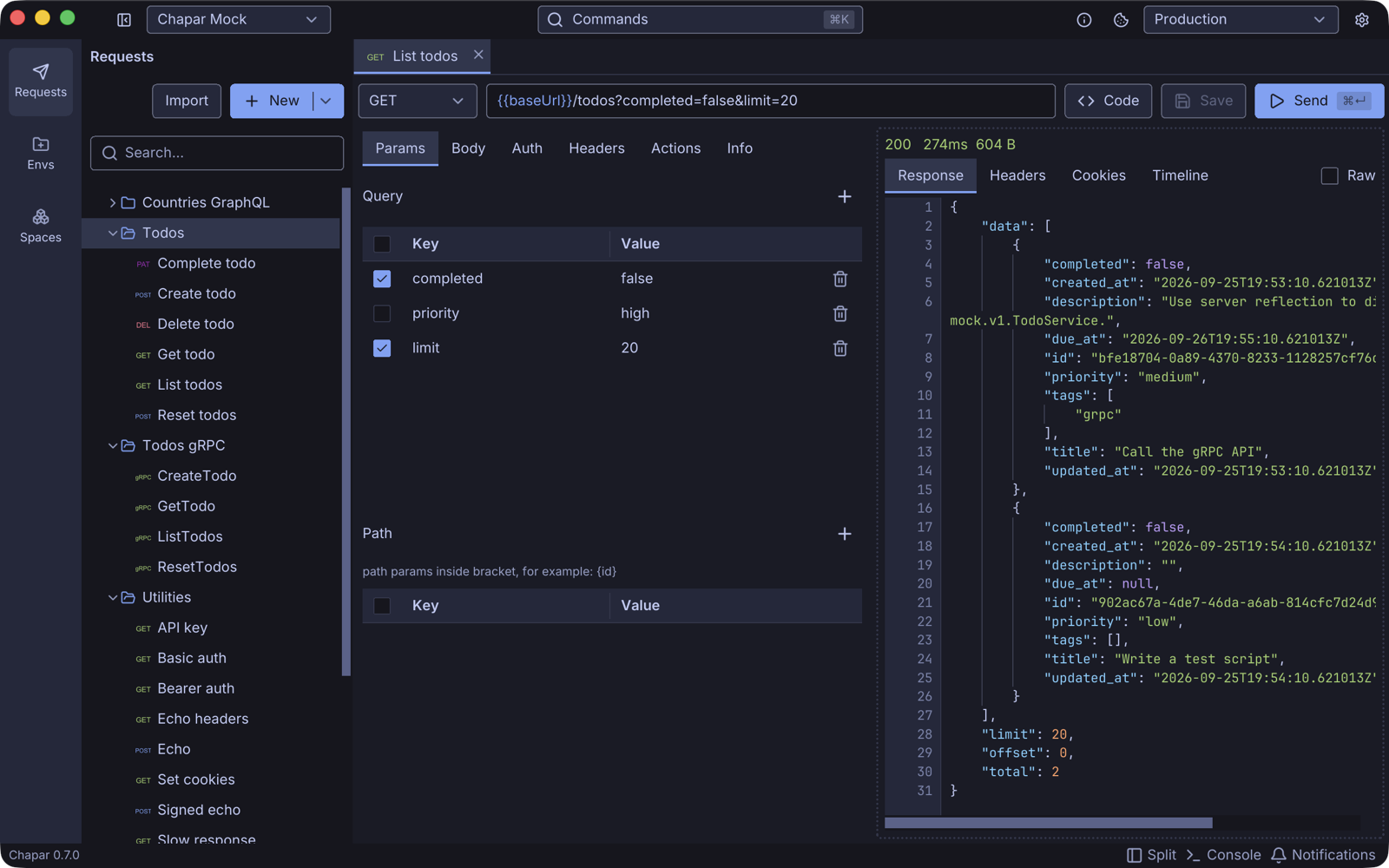
- Title bar: the space you are working in (left), the command palette (middle), and on the right the About button, the cookie jar, the active environment and Settings.
- Navigation bar (far left): Requests, Envs (environments) and Spaces.
- Sidebar: the collections and requests of the current space. Click the panel button next to the space name to hide it.
- Tabs: every request, collection and environment you open gets a tab. A filled dot marks unsaved changes.
- Request and response panes: side by side or stacked. Switch with Split in the footer.
- Footer: the version, Split, the Console with Chapar’s logs, and Notifications.
2. Create an environment
An environment holds the values your requests share, such as a base URL or a token.
Click Envs in the navigation bar, then New.
Click the name at the top of the new tab and call it
Mock.Click Add twice and fill in two variables:
Key Value baseUrlhttps://mocks.chapar.rest/api/v1sessionIdany name of your own, for example alice-laptopPress ⌘S (Ctrl+S on Windows and Linux) to save, and pick Mock in the environment selector in the title bar.
See Environments for more.
3. Send an HTTP request
- Go back to Requests and click New. A request called New Request opens in a tab.
- Keep the method
GETand type{{baseUrl}}/todosas the URL. While you type{{, Chapar suggests the variables of the active environment. - Open the Headers tab and add
X-Session-Idwith the value{{sessionId}}. This gives you a private todo list on the mock server. - Click Send or press ⌘Enter.
The response pane shows the status, time and size, and the JSON body. The Headers, Cookies and Timeline tabs show the rest of the exchange. Save the request with ⌘S and rename it on its Info tab.
Read HTTP Requests for every option.
4. Invoke a gRPC method
- Download
todo.protofrom the mock server repository. - Click the arrow next to New and choose gRPC request.
- Type
mocks.chapar.rest:443as the address. - On the Server tab choose Proto files, click Add proto files… and pick
todo.proto. Chapar loads the methods. - Pick
/mock.v1.TodoService/ListTodosin the method list, and addx-session-idwith your session name on the Metadata tab. - Click Invoke.
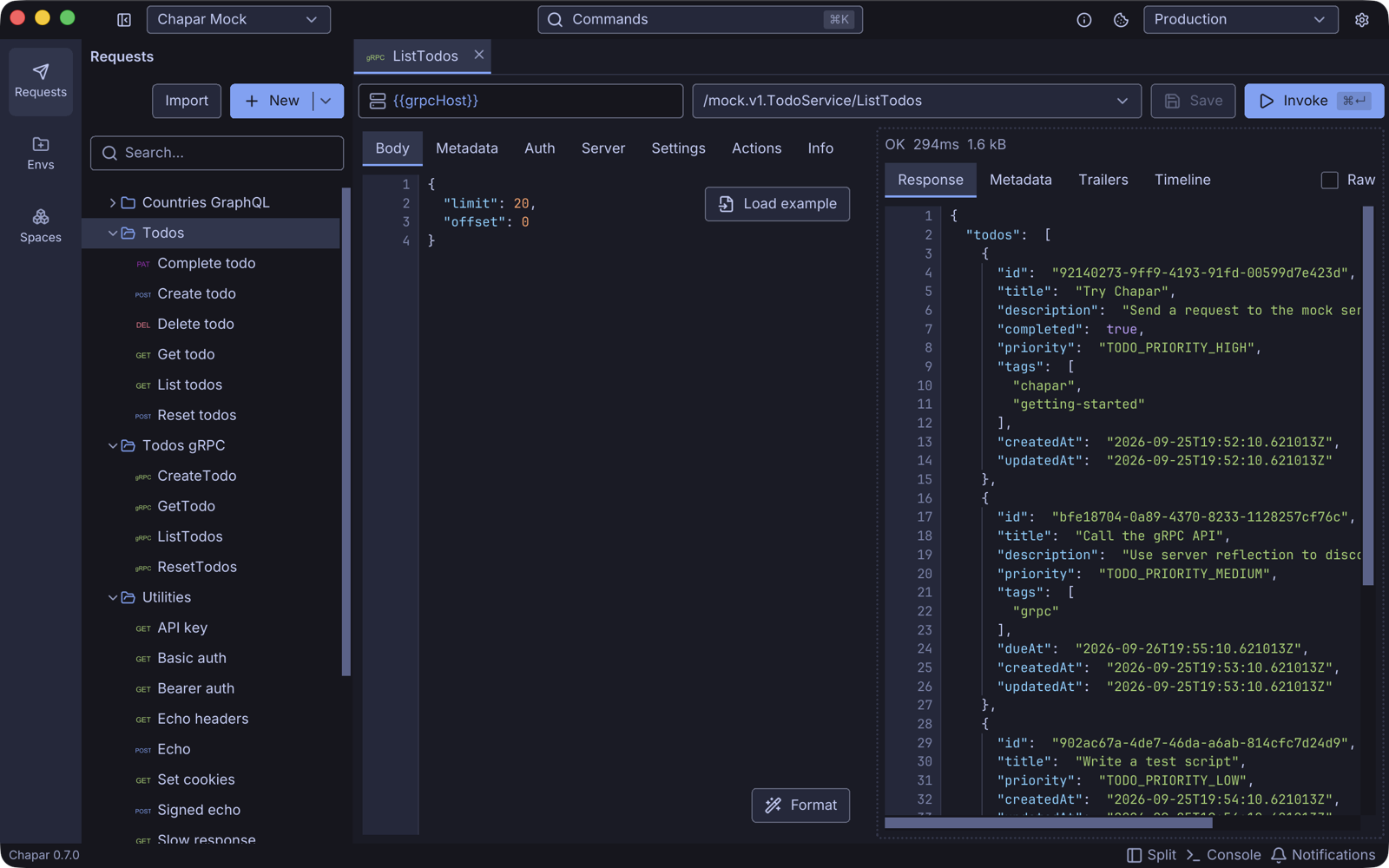
Read gRPC Requests for reflection, TLS, streaming and more.
5. Chain requests
Most APIs need a value from one response in the next request, like an id or a token. Chapar can:
- Extract values from a response into the environment, with a JSONPath, a header or a cookie name.
- Trigger another request before this one is sent.
- Run a Python script before or after the request, with tests.
See Request Actions and Python Scripting.
Shortcuts worth knowing
| Shortcut (macOS) | Windows / Linux | Action |
|---|---|---|
| ⌘K | Ctrl+K | Command palette: open any request, collection or environment, run any command |
| ⌘Enter | Ctrl+Enter | Send the request / invoke the method |
| ⌘S | Ctrl+S | Save the active tab |
| ⌘, | Ctrl+, | Settings |
| ⌘P | Ctrl+P | Go to an open tab |
| ⌘W | Ctrl+W | Close the tab |
| ⌘⇧] / ⌘⇧[ | Ctrl+Shift+] / Ctrl+Shift+[ | Next / previous tab |
| ⌘1 … ⌘8, ⌘9 | Ctrl+1 … Ctrl+8, Ctrl+9 | Jump to a tab, or to the last one |